
A working After Effects project turns into a flat pile fast. Solids, null objects, control layers, adjustment layers, precomps — all dumped at the root of the Project panel with no structure. Finding anything means scrolling.
AEJuice Pack Manager 4 sorts the whole panel into folders in a single action.
The starting state
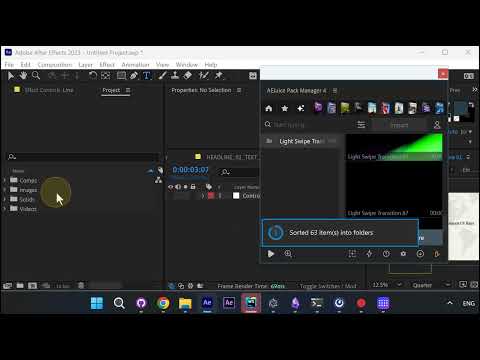
The Project panel on the left holds every item at the same level. The AEJuice Pack Manager 4 panel is docked on the right, showing the imported Light Swipe Transition asset.
After sorting
One pass and the panel is organized. The confirmation reads Sorted 63 item(s) into folders, and the Project panel settles into four folders — Comps, Images, Solids and Videos — instead of a flat list.
Why it matters
- Nothing is renamed or deleted; items are only filed into folders
- Works on projects you did not build yourself, including client files and downloaded templates
- Scales — 63 items here, but the same single action handles a project of any size
Get it
AEJuice Pack Manager 4 is the free plugin that runs this. Install it, open your messy project, and run the sort.