
Picking a font in After Effects usually means clicking down the font dropdown one name at a time, hoping the name tells you what the type actually looks like. The Font Previewer in the AEJuice Pack Manager replaces that with a single scrollable list that renders every installed font in your own text — and lets you walk it with the keyboard.
Open it from the Text menu
Inside the AEJuice Pack Manager panel, open the Text menu and choose Font Previewer. It sits alongside the other text tools like Collect Fonts and Text to Layers.
See your text in every font
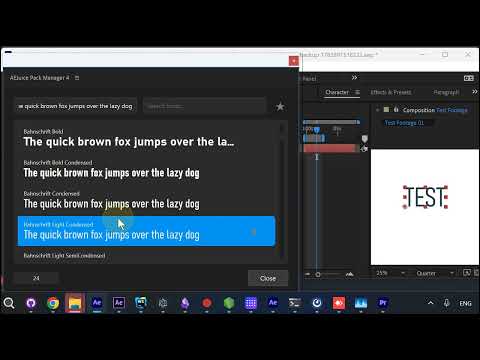
The previewer opens with a preview-text field at the top and the full list of installed fonts below it. Each row renders the same sample text — “the quick brown fox jumps over the lazy dog” by default, or type your own — so you compare typefaces by how they actually look, not by their names.
Walk the list with the arrow keys
Press the down (or up) arrow to move through the fonts one by one. The selected font highlights and the change previews live, so you can browse quickly and stop the moment you land on the right one. There’s a size control at the bottom to scale the preview text as you go.
Find your font fast
That’s the whole point: browse your entire font library in one place, in your own text, with your keyboard — and get back to designing.
The Font Previewer is part of the AEJuice Pack Manager. Get it here.