
Finding the right sound effect usually means opening WAV files one at a time until something fits. The AEJuice Audio Previewer removes that friction: point it at any folder on disk full of sound or music, browse everything with waveform previews, and hear each clip instantly, right inside After Effects.
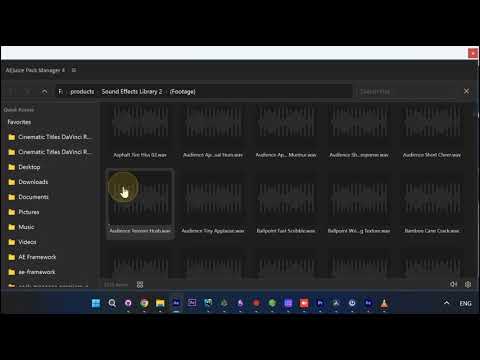
1. Open the Audio Previewer
In AEJuice Pack Manager, open the Audio menu and choose Audio Previewer.
2. Point it at any folder
Aim it at any folder on disk that holds sound or music. Every clip shows up with its own waveform preview.
3. Browse and hear each clip
Scroll through hundreds of effects and hear each one as you go, reels, projectors, ambient textures, crowd reactions, impacts, and more.
4. Find the exact sound fast
Because you preview by ear as you browse, you land on the right clip in seconds instead of opening files one by one.
5. Double-click to import to your timeline
When you find one you like, double-click it to import the sound straight to your timeline. Stack a few together to build a rich, textured soundscape for your edit.
Why it matters
- Preview any folder on disk — point it at any collection of sound or music, no import required
- Hear before you place — every clip plays instantly with a waveform preview, so you find the right one fast
- Straight into your edit — double-click any sound to import it to your timeline and layer them into a soundscape
Try it inside Pack Manager in After Effects.