
Building a 3D text look from scratch — extrusion, borders, stroke, shadow — takes time. With the 3D
text effects in AEJuice Pack Manager, the style is already
built. You just type your words and recolor.
Import a ready-made 3D style
Browse the 3D text effects and hit Import to drop a style straight into your comp. It arrives fully
styled — no building from scratch.
Replace it with your own text
Replace the placeholder with your own text and it keeps the exact same 3D look.
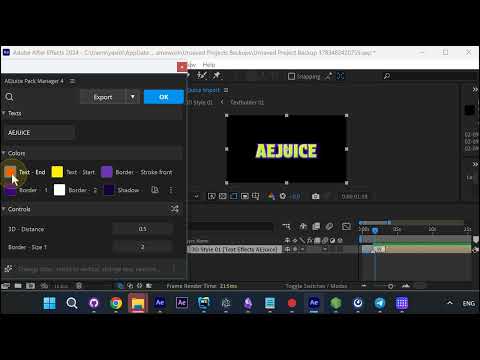
Every color and control in the edit dialog
Open the element’s edit dialog and you get every color slot — the text gradient (Text - Start /
Text - End), Border, Stroke front, and Shadow — plus Controls for 3D - Distance
and Border - Size.
Recolor to match your brand
Recolor the gradient, borders, stroke and shadow, each from its own swatch, until the title matches your
scene.
Preview and you’re done
Preview it and your fully styled 3D title is ready to go.
Get it
The 3D text effects are browsable and importable straight from
AEJuice Pack Manager.