
Got a broken, outdated, or corrupted pack download? You can force a clean redownload in seconds — no repurchase. In the AEJuice Pack Manager you delete the local files, then reopen the pack to pull a fresh copy. Here’s how.
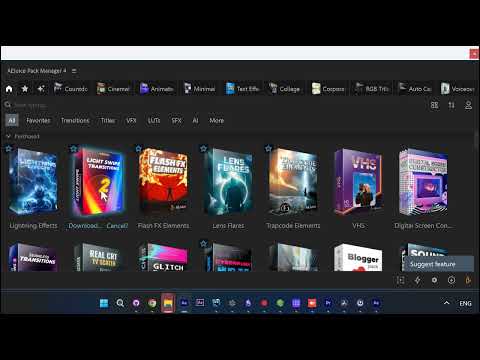
Right-click the pack and Delete files
Launch the AEJuice Pack Manager panel and find the pack in your library. Right-click it and choose Delete files to clear the old, local download.
This wipes the cached copy on your machine — it does not remove the pack from your account, so you keep full access.
Reopen it to redownload
Open the pack again. The Pack Manager pulls a fresh copy back down and lays it out, ready to use.
Here the Light Swipe Transitions pack opens to its full grid of animated transitions. Every element is pre-animated and imports already cut out with transparency — a clean, fresh download exactly as before.
Get AEJuice
Your packs and the Pack Manager are part of AEJuice.