
AI transcription is fast, but it often misspells brand names, product names, and uncommon words. Here’s how to teach AEJuice’s AI tools your exact spelling so it never happens again.
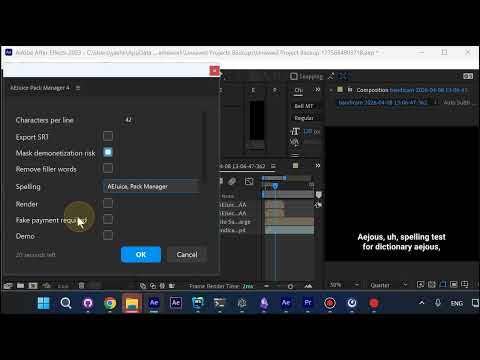
The Problem: Misspelled Brand Names
AI transcription engines don’t always know your brand. In this example, “AEJuice” was transcribed as “AJUS” — clearly wrong.
Step 1: Open the Custom Dictionary
Inside the AI transcription settings, open the custom dictionary field where you can add your own spellings.
Step 2: Type Your Exact Spelling
Enter the correct spelling in the dictionary field. The list is comma-separated, so you can add as many words as you need — brand names, product names, technical terms, anything the AI keeps getting wrong.
Step 3: Save Across All AI Tools
The dictionary is saved across all AEJuice AI transcription products — Auto Captions, Auto Subtitles, and any future AI tools. Set it once, use it everywhere.
Step 4: Press Okay
Press Okay and from now on the word will always be spelled correctly in your transcripts and captions.
Conclusion
A 30-second tweak that fixes a recurring annoyance forever. If your transcripts are full of misspelled brand names, the custom dictionary is the answer.
Try AEJuice Auto Captions: https://aejuice.com