
Promoting a book on social media used to mean hiring a designer or fighting with a clunky mockup template. Now you can drop in your cover, let AI handle the title and colors, and render a finished video in under two minutes. Here’s exactly how.
Step 1: Pick a Design and Import
Open the pack, browse the book mockup designs, and hit Import on the one you like.
Step 2: Drop in Your Book Cover
On the first run you’ll be asked to drag and drop your book cover. You can also select it from the project panel or grab one you’ve already uploaded from the Recent files list.
Step 3: Let the AI Do the Heavy Lifting
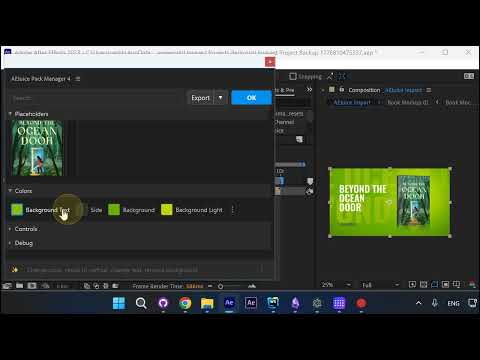
Once you upload, the cover snaps into the mockup automatically. AI reads the title off your artwork and swaps it onto the side of the book. It also samples the dominant color of the cover and repaints the spine and side placeholder so everything matches.
Step 4: Customize Colors (Or Extract a Palette)
If you want more control, open the color panel and mix your own palette — or click Extract and pull a palette directly from your uploaded cover.
Step 5: Edit the Text
The text on the background mirrors the text on the front of the book by default — update one and the other follows. If you want them different, just type into the background text field and it stops mirroring.
Step 6: Adjust Size, Position, and Fonts
Click the placeholder and use the Size and Position sliders to fit the cover the way you want. Click the text to swap fonts.
Step 7: Export and You’re Done
Hit Export from After Effects. When the render finishes, the file opens in a folder so you can preview it right away — ready for social media, TV screens, or anywhere else you promote your book.
Wrapping Up
That’s the whole workflow — upload, tweak, render. The AI handles 90% of what a designer used to charge for, and you end up with a polished promo video in a couple of minutes.
Try it yourself at aejuice.com.