
Pack Manager 4 has an AI sound effect generator built in. You type a description of the sound you
want, it generates variations, and you import the one you like straight into your project — without
leaving your editing app.
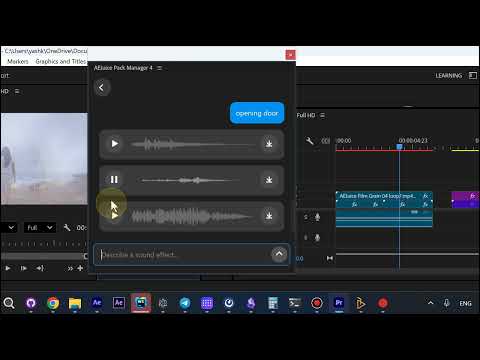
1. Describe the sound
Open the sound effect generator in AEJuice Pack Manager 4 and type what you need into the
Describe a sound effect… field. Plain words are enough — “typing”, “opening door”. Each prompt
you send appears above the results, so you can see what produced what.
2. Get several variations
Every prompt returns multiple takes, each with its own waveform and a play button. Hit play to audition
a variation; the button switches to pause while it plays, so you always know which one you are hearing.
Different takes of the same prompt have different lengths and dynamics — pick by ear.
3. Import the one you want
Each result row has its own Import button on the right. Use it to pull that specific take into your
project. Nothing else gets imported — only the variation you chose.
Why it is useful
- No searching a sound library for a sound that may not exist in it
- Multiple takes per prompt, so you can pick the timing and weight that fits your cut
- Import happens in place, inside Pack Manager, next to the rest of your assets
Get AEJuice Pack Manager: Pack Manager - AEJuice
Free plugins: https://aejuice.com/free-plugins/?utm_source=aejuice_forum&utm_content=ai-sound-effects-generator