
Auto Captions gives you a lot of control over how captions look and behave. Here’s a walkthrough of every caption style setting — grouping, position, emoji, translation, profanity, capitalization, and fillers — with a live preview on the right so you can see changes instantly.
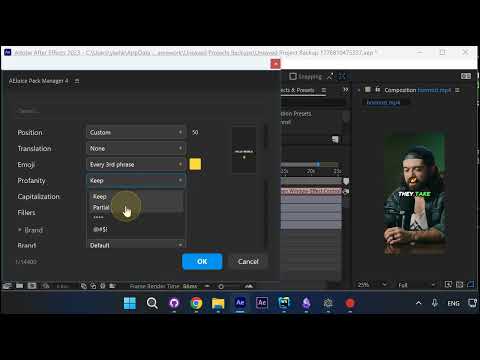
Grouping: Word by Word or Phrases
Choose how captions break up on screen. Word by word shows one word at a time. Phrases groups them into readable chunks. If you pick phrases, you can also choose one or two lines — two lines isn’t always guaranteed (it depends on pause and phrase length), but the plugin will try.
Position: Center, Upper Third, or Custom
Center is the most popular position. For Meta or TikTok ads, switch to upper third — it keeps captions clear of the UI elements that overlay the bottom on those platforms. You can also pick Custom and fine-tune the exact placement.
Translation to Another Language
Translate captions into another language and show only the translation. This is useful when you target content to other countries — the speaker keeps their original audio, and the audience reads captions in their language.
Profanity Masking
Mask profanity either partially (asterisks like ****) or fully (symbols like @#$!). Or keep it as-is. Handy for brand-safe content.
Capitalization
By default captions render in ALL CAPS. You can switch to Sentence case, lower case, or nospacescase (no spaces at all) depending on the look you want.
Filler Removal
Auto Captions strips the most common fillers across most languages by default (“uh”, “um”, etc). You can also add custom fillers — just type them comma-separated in the list and they’ll be removed too.
Live Preview Not Showing?
If the live preview on the right isn’t visible, make sure you have enough space for it — drag the panel wider. If it’s still missing, check the advanced settings and make sure it’s turned on.
Emoji, Skin Tone, and More
Auto Captions can also add animated emoji (default: every third phrase — AI picks the best placement and may skip when nothing fits), cycle skin tones, and more. Every setting updates the live preview instantly so you can dial in the look before committing.
Try Auto Captions for After Effects →
Also part of Pack Manager: Pack Manager - AEJuice