
Animated bar-chart templates look great until you have to swap in your own numbers. In AEJuice Pack Manager,
you can edit every part of a chart in one dialog, or skip the manual work entirely and just describe
the change in plain English and let the AI rewrite the whole chart for you.
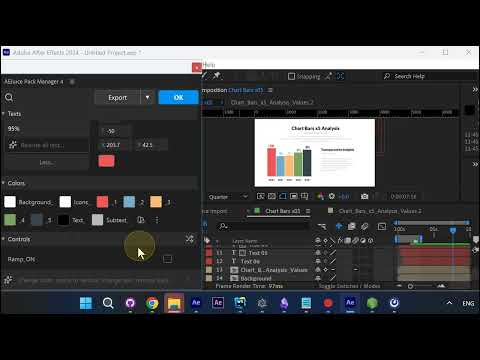
Pick an animated chart
Open the Charts category in Pack Manager and drop in an animated bar chart. The whole thing comes in
pre-animated, ready to customize.
Retype the text in one place
Open the edit dialog. The Texts section lists every title, subtitle, and label in the chart, each in
its own field, so you retype them without hunting through layers.
Watch it update live
Your edits update the bar chart live in the composition, so you see exactly how it reads as you go.
Set values, font, and numbers
Retype each value in its own field and set the font, so figures like your revenue land right on the bars.
Recolor everything
The Colors section recolors the background, bars, icons, text, and subtext, each from a single swatch.
Dial in the animation
Under Controls, set the animation duration, multiplier, decimal places, and thousands separator for
the count-up. Chart Min and Chart Max scale the bars, so any range of numbers fits cleanly.
Or just describe the change (AI)
Here’s the shortcut: type a prompt like “display yearly earnings of top 5 tech companies in 2026” into
the Describe what to change box, and the AI rewrites the entire chart — labels and values — in one
step. The demo turns it into a Tech Earnings 2026 chart with Apple, Microsoft, Google, Amazon, and
Meta filled in automatically. Then fine-tune with the same controls.
Get it
The AI chart editing lives in AEJuice Pack Manager — browse,
import, and edit animated charts (and everything else) straight from the panel.