
Restyling a template used to mean digging through every text layer, swapping images by hand, and re-coloring each element one at a time. In AEJuice Pack Manager 4, you can now describe the change you want in plain English and let the AI rewrite the copy and regenerate every placeholder image for you — then export straight into your comp.
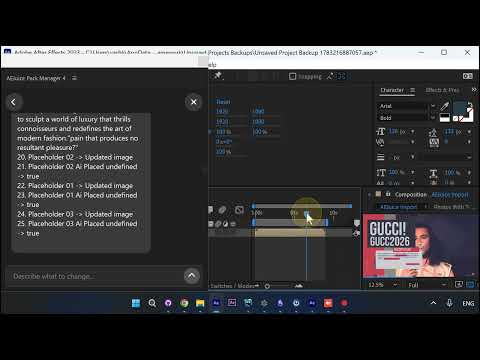
Here’s the full flow.
1. Pick a template and open the AI box
Open Pack Manager 4 and choose any template from the library. At the bottom of the panel you’ll see the Describe what to change box — this is where you talk to the AI.
2. Describe the change in plain English
Type what you want the template to become. In this example: “make it about fashion gucci 2026”. Press Enter and the AI starts working.
3. The AI rewrites your text
The panel shows Thinking… while the AI rewrites the headlines and body copy to fit the new theme — no manual layer editing.
4. Every placeholder is regenerated
The AI updates each placeholder in turn — you can watch it mark Placeholder 01, 02, 03 → Updated image / AI Placed as it generates fresh, on-brand visuals for every slot.
5. Review and export
When it finishes, review the new Placeholders and Colors in the panel. From here you can still change any text or photo manually — or just hit Export to render the whole template into your composition in one click.
Why it matters
- Plain-English editing — describe the result, skip the manual layer work
- Text + images together — the AI rewrites copy and regenerates placeholder visuals in one pass
- On-brand in seconds — retheme a whole template around any concept before you export
Try it inside Pack Manager in After Effects.