
Want movie-style title cards without spending hours tweaking text, fonts, and sizes? Here’s how to use AI to rewrite every title in a cinematic template with one click, then fine-tune fonts and export with transparency — all inside After Effects.
Step 1: Import the Composition
Click Import and drop the cinematic titles composition onto your timeline. Everything you need — names, fake movie titles, credits — is already laid out and animated.
Step 2: Open the Edit Panel
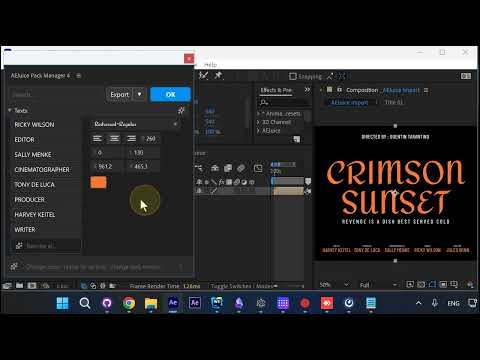
With the composition selected, click Edit. This is where you’ll rewrite the text — either one line at a time, or all at once with AI.
Step 3: Let AI Rewrite Every Title
Instead of retyping every line, use the AI prompt. Tell it what you want — in this case, a fake Quentin Tarantino movie with a new title and cast — and it rewrites every text layer in the comp.
Press Enter and the composition updates instantly.
The AI preserves the original character length of each line, so your new names don’t overflow or break the layout. You can still edit any line manually if you want to fine-tune it.
Step 4: Change the Font Globally
Pick any text layer and change its font. The font change propagates to every similar text layer in the composition — so if you change the font on one name, every name updates at once.
Some fonts render larger than others, so you may need to adjust the size. Size changes also propagate across all layers that shared the original size and font.
Step 5: Add Footage Underneath (Optional)
Want a video behind the titles? Drag and drop a clip onto the timeline and move it below the title layer.
Scale it to fit the frame.
Step 6: Export with Transparency
If you’re planning to drop the titles into another editor, skip the background and export with transparency. Hit Export.
Once the file is done, drag it into Premiere, DaVinci, Final Cut, or any editor — the alpha channel is preserved. You can also reuse it across other After Effects compositions.
Wrap Up
That’s a full cinematic title sequence — rewritten, restyled, and exported — in under three minutes. The AI handles the heavy lifting, font propagation keeps things consistent, and transparent export means the titles drop into any project.
Try AEJuice Cinematic Titles: https://aejuice.com