
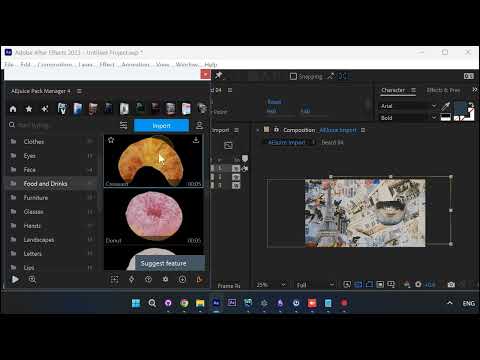
Pack Manager 4 ships with a huge, categorized library of ready-to-use animated elements you can drop straight into After Effects, backgrounds, buildings, faces, food, and more. Every asset is already animated and already cut out, so there is no keyframing, cropping, or masking on your end, you just place it on the timeline and size it into your scene. In this tutorial we stack a few of them into an animated collage.
Step by step
1. Browse the categories. Open Pack Manager 4 in After Effects and open a category, for example Backgrounds. The library is organized by type (Backgrounds, Buildings, Faces, Food and Drinks, and more), so you can find the element you want fast.
2. Import your background. Click Import and the element downloads and drops straight into your composition, ready to build on. No manual downloading, unzipping, or importing.
3. Stack a building on top. Jump to the Buildings category and import an element. It comes in as its own layer, stacked on top of the background, already animating.
4. Every asset is a ready-made animation. Each element lands in your scene already cut out with transparency and moving on its own, so there is nothing to prep, you are arranging finished animations, not building them.
5. Add a face element. Head into the Face category and grab a beard the same way, straight from the library. It layers onto the collage with no cropping or masking needed.
6. Drop in food and drinks. Browse Food and Drinks and add a croissant into the mix as another layer. Keep pulling elements from any category to build out the scene, piece by piece.
7. Place and adjust Scale. Because everything is already animated, the only work left is placement and sizing. Select a layer, press S to reveal Scale, and resize each element so it sits right in the frame.
8. Arrange your layers. Select and reorder your layers to fine-tune where each element sits in the stack.
9. Preview. Hit preview and the whole collage plays, every element animating on its own, built entirely from Pack Manager assets.
Why it is fast
- Huge categorized library — backgrounds, buildings, faces, food, and more, all ready to drop in.
- Cut-out animations — every asset lands positioned and already moving, no cropping or masking.
- Just place and size — drop each animated element in and adjust its Scale, no keyframing required.
You can try it inside Pack Manager in After Effects: Pack Manager - AEJuice