
The Brand section in Auto Captions is where you dial in everything client-specific: custom fonts and colors, speaker colors, CTAs, correct spelling of brand names, and saved presets. Here’s how each setting works.
Brand Overview
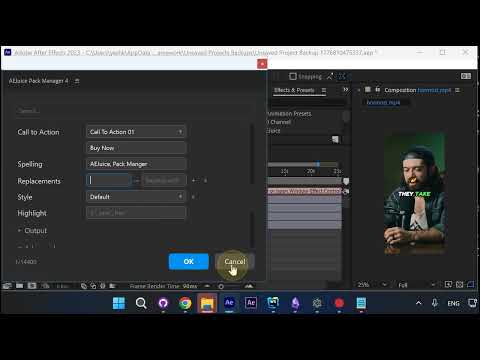
Open the Brand group and you’ll see Brand, Speakers, Call to Action, Spelling, Replacements, Style, and Highlight — every setting that varies between clients lives here.
Speakers: Different Colors Per Voice
Switch Speakers to Per Speaker and each voice gets its own color. If you know the exact speaker count in advance, set it manually for the cleanest result. If not, leave it on Auto and let the plugin detect them.
Call to Action at the End
The CTA is prepended after the last caption. Pick from the built-in list of animated CTAs and preview them right in the panel.
Custom CTA Text in Any Language
Once you select a CTA, type your own text — “Buy Now”, “Subscribe”, anything in any language.
Spelling: Brand and Industry Terms
Add your brand name and any industry-specific terms comma-separated in the Spelling field. Auto Captions will make sure they’re spelled correctly in the output.
Find and Replace for Custom Fixes
If Auto Captions misses a specific spelling correction, use the Replacements row. Type what to find, type what to replace it with, and add as many pairs as you need.
Style Presets for Multiple Clients
The Style field defaults to whatever preset you picked when you opened Auto Captions. Keep it default in most cases — but if you work with multiple clients, overwrite the style and save it as a preset so you can switch per client in one click.
Highlight Dollar Amounts and Specific Terms
The Highlight field colors specific terms in each caption. Use $* to match any dollar amount (star is a wildcard), or list specific words comma-separated — each word gets its own highlight color.
Wrap Up
Brand settings are what make Auto Captions usable for real client work — set them once per client, save a preset, and every video keeps the same look and spelling.
Try Auto Captions for After Effects →
Also part of Pack Manager: Pack Manager - AEJuice