
Building a hand-crafted, letter-by-letter title animation in After Effects usually means keyframing
every character by hand. With the Animated Alphabet pack in AEJuice Pack Manager,
you skip all of that: each letter is already a fully animated element, so you just type your word and
it plays out on the timeline.
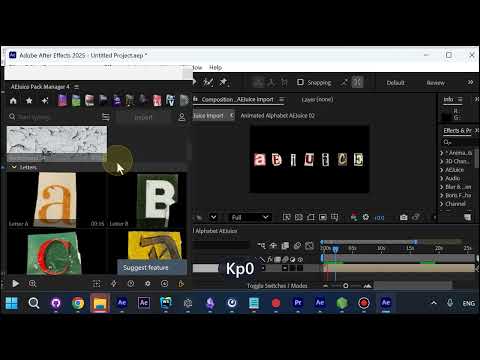
Import the Animated Alphabet
Open the AEJuice Pack Manager panel and import the Animated Alphabet. Every letter comes in as its own
animated element, cut out with transparency and ready to move on its own.
Every letter lives in the Letters category
Inside the pack, each character sits in the Letters category. Add the letters you need and they
spell your text right on the composition, no keyframing required.
The word plays out on its own
Because every letter is pre-animated, the whole word comes alive at once. Each cut-out character moves
independently, giving that lively, collage-style look with zero manual animation.
Fine-tune in the edit dialog
Open the edit dialog to dial in the look. The Spacing control tightens or loosens the letters so
they sit exactly how you want. The text itself is set when the word is created, so the edit dialog is
purely for adjusting spacing.
Get it
The Animated Alphabet is part of the AEJuice library,
browsable and importable straight from the Pack Manager.